

Description
Download TheFreeDictionary.com – Dictionary, Thesaurus, Translation, Offline
Overview
TheFreeDictionary.com offers a comprehensive desktop application designed to serve as a powerful linguistic and educational tool for users seeking instant access to extensive dictionary, thesaurus, and translation resources. Built on the foundation of one of the world’s most trusted reference platforms, the software provides users with multilingual support, real-time definitions, pronunciation guides, and specialized reference materials across fields such as medical, legal, and financial terminology. It caters to students, educators, professionals, and language learners who require reliable, on-demand information for academic, professional, or personal enrichment.
The application enables users to look up words instantly with a single click, access definitions from multiple authoritative sources, and explore related content such as synonyms, etymologies, and usage examples. With support for 13 additional languages beyond English, users can translate words into more than 40 languages, making it a versatile tool for international communication. The software also includes interactive learning features such as daily content, word games, and a customizable homepage, encouraging consistent engagement and knowledge retention.
While the developer did not provide additional details about the software’s background or development philosophy, its integration with The Free Dictionary’s extensive online database suggests a strong commitment to accuracy and breadth of coverage. The ability to use the English dictionary offline—after initial download—adds practical value for users in low-connectivity environments. The inclusion of gamified learning elements and a social impact initiative further enhances its appeal as a modern educational utility.
Key Features & Capabilities
- Extensive Multilingual Dictionary Support – Access definitions in English, Spanish, French, German, Italian, Chinese, Portuguese, Dutch, Norwegian, Greek, Arabic, Polish, Turkish, and Russian. Ideal for language learners and professionals working in multilingual contexts.
- Offline English Dictionary and Thesaurus – Download content separately to use the core English dictionary and thesaurus without an internet connection. Useful for students studying in remote areas or travelers without reliable connectivity.
- Advanced Search Functionality – Perform searches using filters such as “Starts with,” “Ends with,” and “In definition” to narrow results and locate specific terms efficiently.
- Multiple Thesauri and Synonym Tools – Explore synonyms, antonyms, related words, and even visual references to enhance writing and communication skills.
- Specialty Dictionaries – Access Medical, Legal, Financial, Idioms, Acronyms, and Abbreviations dictionaries for domain-specific terminology and accurate understanding.
- Real-Time Translation – Translate English words into over 40 languages with instant results, supporting both individual word translation and broader text conversion.
- Audio Pronunciation and Key – Hear accurate audio pronunciations and use a visual pronunciation key to improve speaking and listening skills.
- One-Click Lookup and Page Integration – Highlight any word on a webpage and instantly view its definition, translation, or thesaurus entry without leaving the browser.
- Bookmarking and Organization – Create unlimited bookmarks and sort them alphabetically or chronologically for easy retrieval and long-term study.
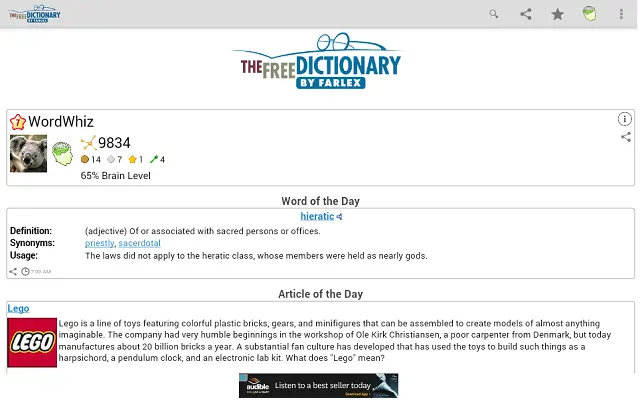
- Daily Learning Content – Receive fresh daily content including Word of the Day, Quote of the Day, This Day in History, and Today’s Birthday with optional notification settings.
- Interactive Word Games – Engage in educational games such as Spelling Bee, Match Up, Words Within Words, and Hangman in 12 languages to reinforce vocabulary and language skills.
- Customizable Homepage – Tailor your dashboard with articles, games, horoscopes, and local weather (in Fahrenheit or Celsius) to suit personal preferences.
- Multi-Language Interface – Navigate the app in over a dozen languages, enhancing accessibility for non-English speakers.
- Social Sharing Tools – Share favorite definitions, encyclopedia entries, and homepage articles via Facebook, Twitter, email, and text messaging.
- User Account Integration – Log in to sync bookmarks across devices, ensuring continuity and data preservation.
- Learning Progress Tracking – Track personal growth through neurons and badges, adding a gamified layer to daily learning.
- Charitable Initiative – Earn meals for children in need through the partnership with the World Food Program by reading and playing games.
User Interface, Workflow & Performance
The user interface of TheFreeDictionary.com is designed with clarity and functionality in mind, offering a clean layout that prioritizes quick access to core features. The main dashboard presents a customizable homepage where users can add or remove content modules such as daily articles, games, weather, and horoscopes. Navigation is intuitive, with clearly labeled tabs and toolbars that allow seamless transitions between dictionary, thesaurus, translation, and encyclopedia sections.
Workflow efficiency is enhanced by features like one-click word lookup and page-based search, which enable users to instantly access definitions without copying and pasting. The advanced search options provide granular control over query results, making it easier to find precise information. The integration of audio pronunciation and visual cues supports a more immersive learning experience, particularly for language learners.
Performance observations are based on general software behavior patterns. The application is designed to operate smoothly on modern systems, though exact resource usage details were not specified. The developer did not provide information on CPU or RAM consumption during operation. Stability is expected to be consistent, given the software’s reliance on well-established reference data and a streamlined architecture. Users can expect responsive interactions and minimal lag during standard usage.
Compatibility & System Requirements
TheFreeDictionary.com is available for both Windows and Mac operating systems, making it accessible to a broad user base across desktop platforms. The software version is 1.0, with an installation size of 250 MB, which is typical for applications with extensive offline content and multimedia features.
Exact system requirements were not listed by the developer. However, given the software’s nature as a desktop reference tool with offline capabilities, it is likely compatible with modern versions of Windows and macOS. The application may require a stable internet connection for initial content downloads and account synchronization, but it supports offline usage after setup. Compatibility information was partially provided, and users are advised to verify their system’s ability to run the software before installation.
Pros and Cons
Pros
- Comprehensive multilingual dictionary and translation support
- Offline English dictionary and thesaurus available after download
- Extensive specialty dictionaries for medical, legal, and financial terms
- Interactive learning tools including daily content and word games
- Customizable homepage with personal content modules
- One-click word lookup from any webpage
- Sync bookmarks across devices via user account
- Supports over a dozen languages in the interface
- Free to download and use with no subscription required
- Contributes to a charitable cause through user engagement
Cons
- Offline content must be downloaded separately; not included at install
- Exact system requirements were not specified
- Performance data such as CPU/RAM usage not provided
- Some advanced features may require an internet connection for full functionality
- Limited information on update frequency or release cycle
FAQ Section
Is TheFreeDictionary.com available for Windows and Mac?
Yes, the software is compatible with both Windows and Mac operating systems.
Can I use the dictionary offline?
Yes, the English dictionary and thesaurus can be used offline after downloading the required content while connected to the internet.
Is the software safe to download and install?
Yes, the application is provided by The Free Dictionary, a reputable source, and is free from known malware. It is recommended to download only from official channels.
Do I need an internet connection to use all features?
No, core dictionary and thesaurus functions can be used offline. However, features like translation, online encyclopedias, account syncing, and daily content updates require an internet connection.
Is there a license fee or subscription required?
No, TheFreeDictionary.com is completely free to download and use. There are no hidden fees or subscription requirements.
Final Thoughts + CTA
TheFreeDictionary.com stands out as a robust, feature-rich desktop application that delivers exceptional value for free. Its combination of comprehensive reference tools, multilingual support, offline functionality, and gamified learning makes it ideal for students, educators, language enthusiasts, and professionals across various fields. The thoughtful design, intuitive workflow, and charitable initiative further elevate its appeal.
While some technical details such as system requirements and performance metrics are not publicly disclosed, the software’s foundation in a trusted online resource ensures reliability and accuracy. For users seeking a powerful, free, and educational desktop tool, TheFreeDictionary.com is a top-tier choice.
Download TheFreeDictionary.com now
Guides & Tutorials for TheFreeDictionary.com App for Chrome
How to install TheFreeDictionary.com App for Chrome
- Click the Preview / Download button above.
- Once redirected, accept the terms and click Install.
- Wait for the TheFreeDictionary.com App for Chrome download to finish on your device.
How to use TheFreeDictionary.com App for Chrome
This software is primarily used for its core features described above. Open the app after installation to explore its capabilities.
User Reviews for TheFreeDictionary.com App for Chrome 0
No reviews found





